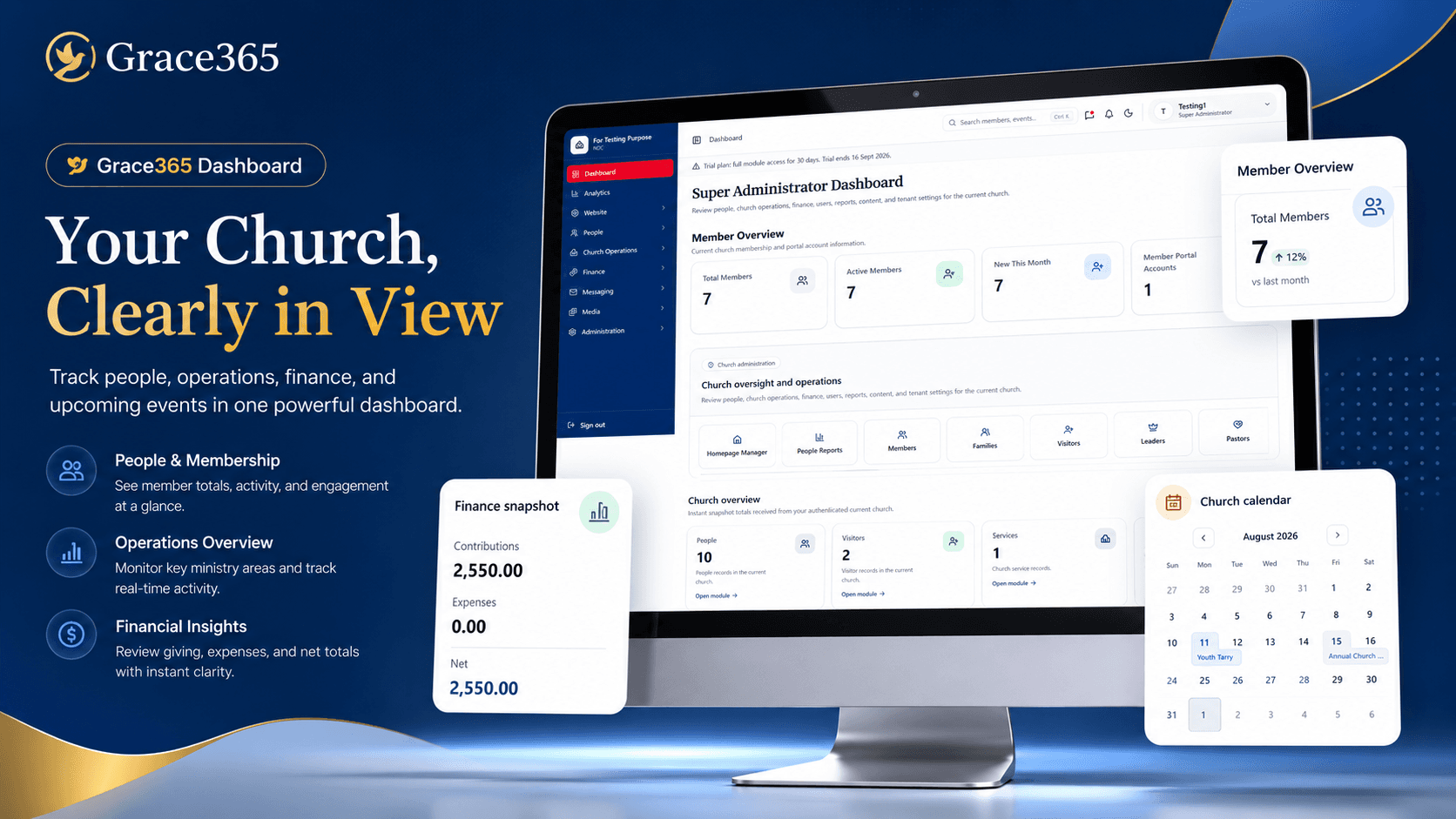
Managing a growing church involves much more than conducting services. Behind every successful church are people, departments, finances, activities, attendance records, volunteers, visitors, reports, and countless administrative responsibilities. As a church grows, keeping all of this information organized can become increasingly difficult when relying on notebooks, spreadsheets, paper files, and disconnected tools.
Grace365 Church Management System is designed to help churches move to a more organized digital environment.
What Is Smart3ch?
Smart3ch is a platform for management systems, powered by SAM Creative Hub. It is designed to provide digital management solutions for different types of organizations and industries. Individual systems can be developed and provided through the platform to address specific organizational needs.
Grace365 is the Church Management System within the Smart3ch platform. It focuses specifically on helping churches manage people, operations, attendance, finances, reporting, administration, member access, and mobile services from one centralized environment.
Why Churches Need Digital Management
Church administration can become more complex as membership and activities increase. A church may need to keep track of hundreds of members, visitors, volunteers, departments, attendance records, financial transactions, activities, and reports.
Key Features of Grace365
👥 1. Manage Members, Visitors & Volunteers
People are at the heart of every church, and having organized information about the church community is essential.
Grace365 allows authorized administrators to manage different categories of people, including:
• Members
• Visitors
• Volunteers
• Church workers
• Other church-related profiles
Instead of keeping information across notebooks, spreadsheets, and paper forms, the church can maintain centralized digital records.
This can make it easier to find member information, update and manage records.
⚙️ 2. Church Operations
Churches manage many activities beyond weekly worship services. Departments, programs, events, ministries, and other activities all require coordination.
Grace365 provides tools for managing important operational information and keeping church activities organized.
📅 3. Attendance Management
Attendance is an important part of understanding participation in church activities.
Grace365 provides tools for recording and managing attendance information. Instead of relying entirely on paper attendance sheets, authorized users can maintain digital attendance records and access information when needed.
💰 4. Church Finance
Financial management is another important part of church administration. Churches may receive contributions, make expenses, prepare budgets, and maintain financial records that need to be organized properly.
Grace365 includes financial management tools designed to help churches organize information such as:
• Contributions
• Expenses
• Budgets
• Financial activities
• Financial reports
• Other financial records
The system provides authorized users with a centralized environment for managing and reviewing financial information.
📊 5. Reports & Information
Church leaders and administrators often need information to understand what is happening within the organization.
Grace365 provides reporting capabilities covering areas such as:
• Membership
• Attendance
• Finance
• Church activities
• Administrative information
Rather than manually compiling information from multiple sources every time a report is needed, a centralized system can make information easier to access and organize.
🔐 6. Secure Admin & Member Access
Not everyone in a church should have access to every piece of information. Grace365 is designed around different levels of access so that administrators and members can interact with the system according to their assigned roles.
Authorized administrators can manage church information, users, permissions, and other administrative functions, while members can access the features and information made available to them.
📱 7. Android Mobile App
Today, many church members rely primarily on their smartphones for accessing digital services. Grace365 extends the church management experience beyond the desktop through its Android mobile app.
This gives churches another way to stay connected with their members beyond the traditional administrative office.
📖 8. Built-In Bible With Multiple Translations
Grace365 also brings a Bible-reading experience into the mobile environment.
The system includes a built-in Bible with support for multiple available translations, allowing users to read Scripture directly from their mobile devices.
A Digital Environment for Church Administrators
One of the main purposes of Grace365 is to provide church administrators with a centralized environment for managing their responsibilities.
Instead of switching between different tools for membership records, attendance, finances, reports, and other activities, administrators can work with these functions through the church management system.
This can be particularly useful for churches that are growing and need a more structured way to manage increasing amounts of information.
💵 Simple & Affordable Pricing
Grace365 is designed to provide churches with an affordable entry point into digital church management.
$40 USD — One-Time Setup Fee
The initial setup fee covers the setup of the church within the system.
$10 USD — Monthly Subscription
After setup, the church subscription is $10 USD per month.
Your church also receives:
• 🎁 One-month free demo before payment
• 🧑🏫 Free user training
• 📱 Android mobile access
• 🔐 Secure administration and member access
• 📊 Church management and reporting tools
“Try Grace365 for one month before payment and see how it fits your church.”
🎁 Free One-Month Demo
Choosing a management system is an important decision for any church. That's why Smart3ch provides a one-month free demo before payment.
The demo gives your church an opportunity to explore Grace365, understand its features, and see how the system can fit into your existing administrative processes.
You can use the demo period to introduce your administrators to the platform, explore the available modules, and determine how Grace365 can support your church's day-to-day management.
🧑🏫 Free User Training
The training is designed to help your team become comfortable with the system and understand how to use the available features.
Why Move Your Church Management Online?
Moving church administration into a digital environment can provide several practical benefits.
Information can be easier to organize and access. Authorized administrators can work with records without depending entirely on physical files. Reports can be generated from organized information.
🔐 Privacy & Data Protection
Church management systems may contain important organizational and personal information. For this reason, privacy and responsible handling of information are important parts of using any digital platform.
Before using Grace365 or any Smart3ch service, churches and users are encouraged to review our privacy policies to understand how information is collected, used, stored, and protected.
👉 READ OUR PRIVACY POLICY
🚀 Ready to See Grace365 in Action?
Request a free one-month demo and explore Grace365 before payment.
During the demo, your church can discover the available features, introduce administrators to the platform, and see how the system can support your church's management needs.
👉 REQUEST YOUR FREE GRACE365 DEMO
📞 Call / WhatsApp:
0770 449 708 | 0888 323 165